
Desktop traceroute map · Windows, macOS, Linux · v0.2.0-beta.5
See where your packets actually went.
Route Map is a free, open source visual traceroute for Windows, macOS and Linux. It runs the trace on your own computer and draws every hop on a world map: each router is placed by its operator's own hostname before any IP database is asked, every placement the round-trip time makes impossible is rejected, and each hop says where its location came from.
Also: Windows Installer Windows Zip macOS Apple silicon macOS Intel Linux Debian, Ubuntu (.deb) Linux Fedora, RHEL, openSUSE (.rpm) Linux AppImage Linux tar.gz. v0.2.0-beta.5, checksums and install steps.
Free and open source, AGPL-3.0 github.com/osintph/routemap
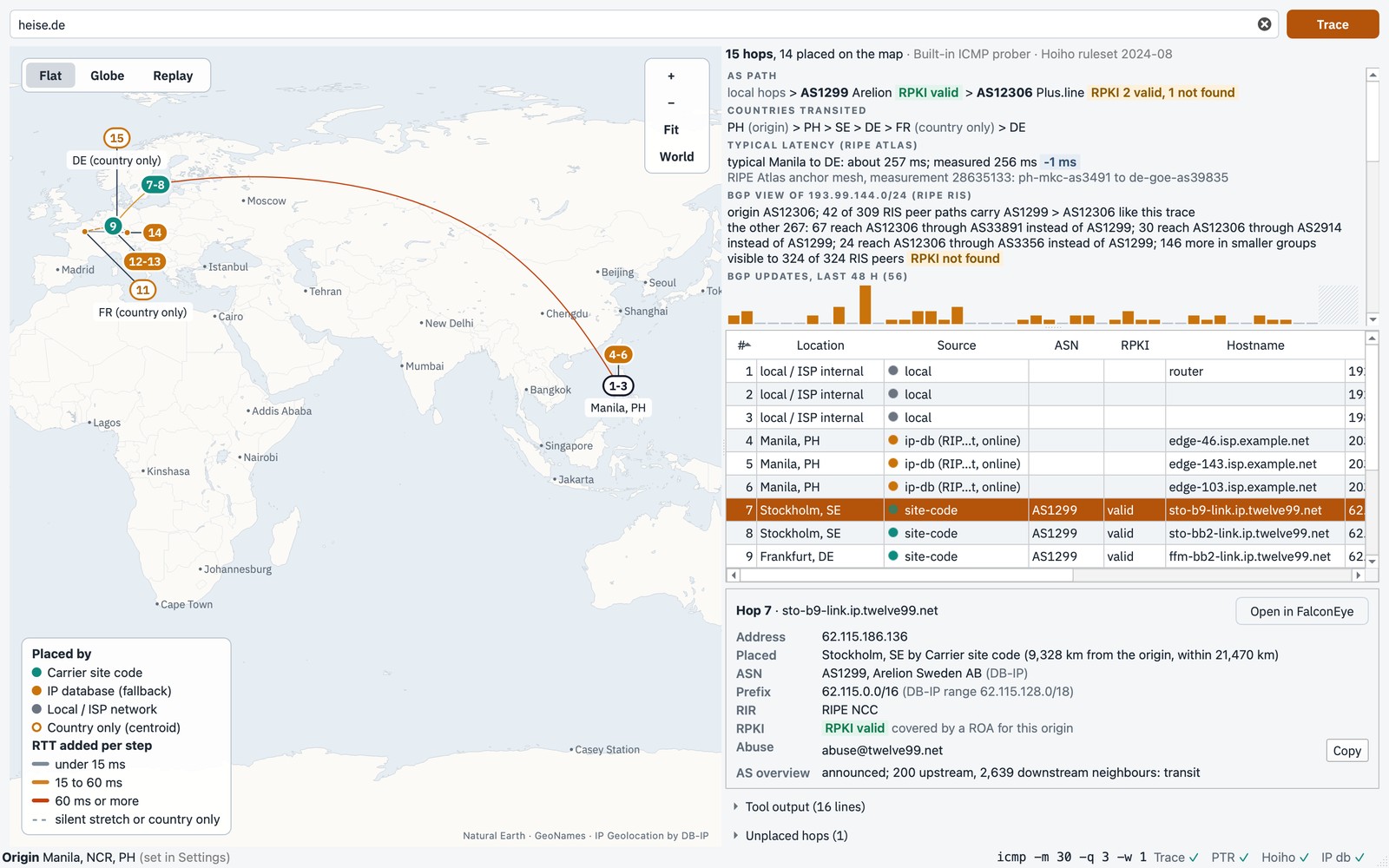
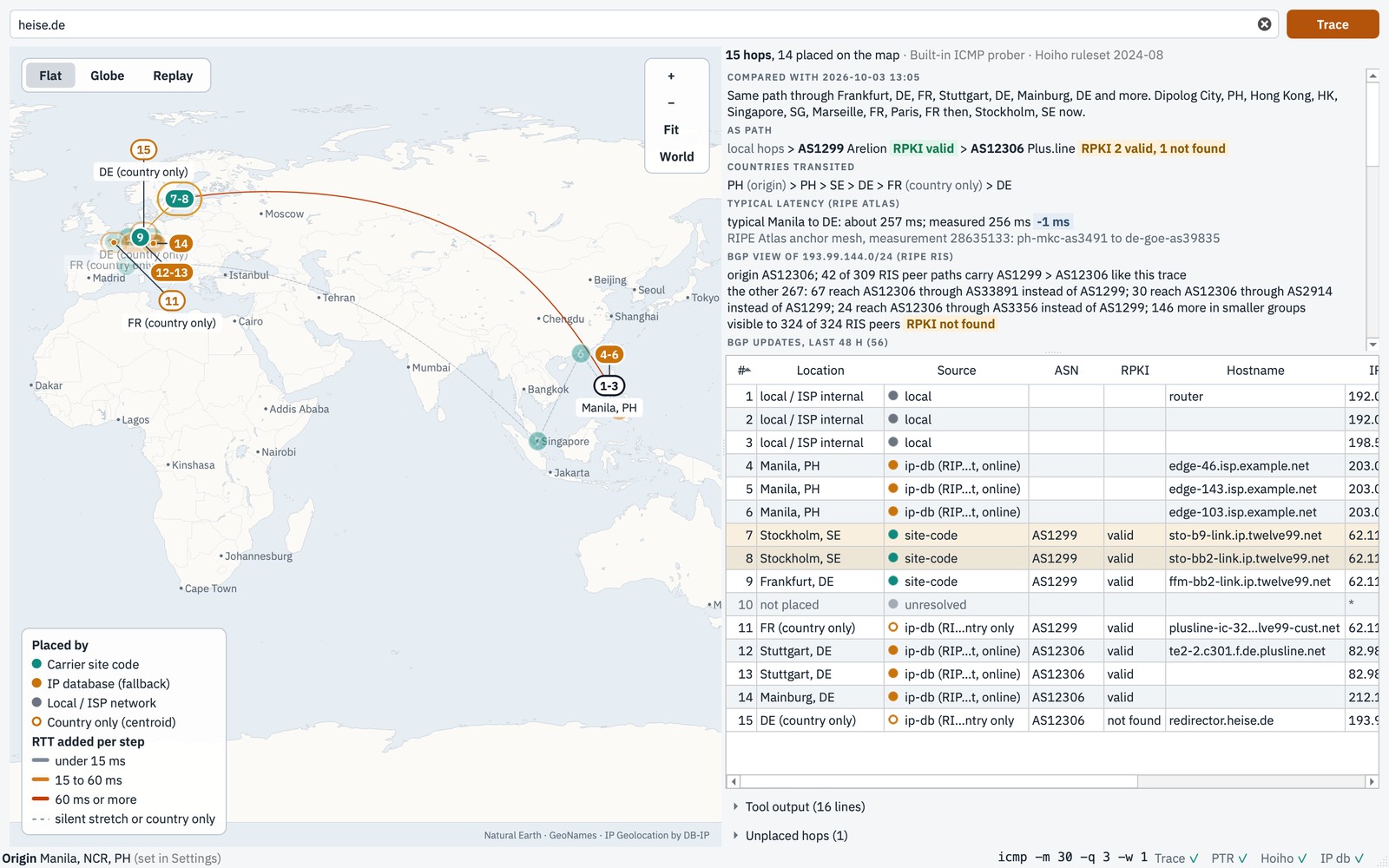
A live trace from Manila to heise.de with the built-in prober, origin set in Settings. The first six hops, the home network and the ISP, are shown with documentation addresses.
How it places a hop
Hostname first
Operators name routers after their sites: ffm-bb2-link.ip.twelve99.net is
Arelion in Frankfurt, and sto, hnk, sng and
prs are Stockholm, Hong Kong, Singapore and Paris. For backbone routers an IP
database often knows only the country, or the place where the address block was registered.
Route Map reads the names first, with CAIDA's Hoiho rules and a table of carrier site codes,
and falls back to an IP database only when the name says nothing: DB-IP Lite on your
machine, or RIPEstat online.
Checked against physics
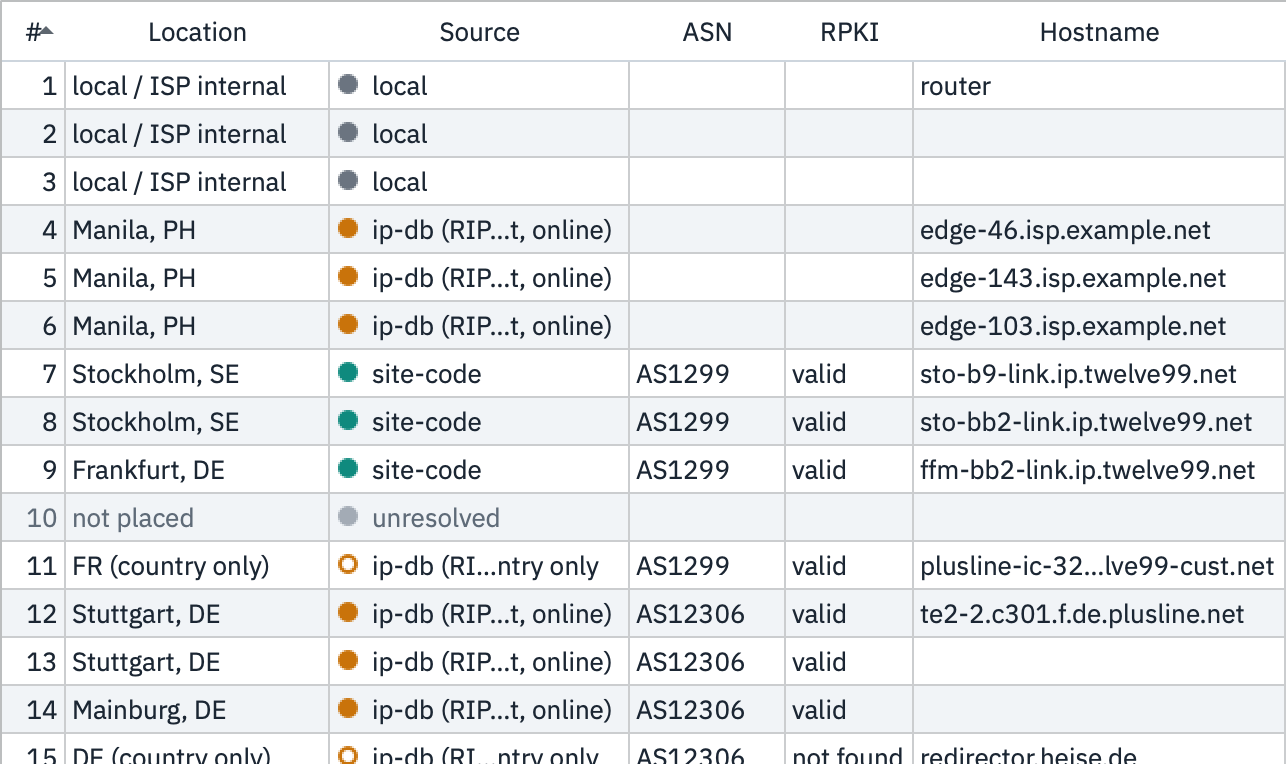
Light in fibre covers about 200 km per millisecond, so each millisecond of round trip allows about 100 km: a hop that answers in 5 ms is within about 500 km, plus 300 km of slack for an approximate origin. Any placement farther than that is rejected, whatever its source, and the reason is shown. So is a database answer that would need a detour the round trip did not pay for.

The IP database puts hop 9 in France, 10,744 km from Manila. It answered in 27 ms, which allows at most 3,054 km, so the placement is rejected.
Nothing guessed, nothing dropped
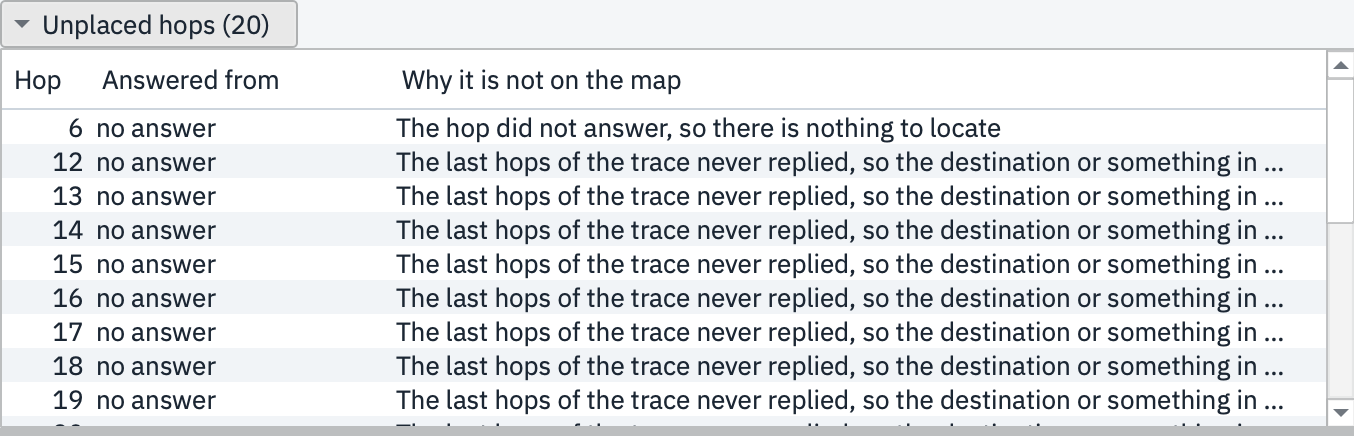
Every hop carries its source, and a hop the database knows only to a country is drawn hollow. A hop that cannot be placed stays in the table and in the Unplaced panel, with the reason it is not on the map.
Beyond where the hops are
Beside the map: the networks your packets crossed (the AS path, from DB-IP Lite ASN on your machine) with an RPKI badge for each, the countries they went through, what RIPE's route collectors see for the destination prefix, its BGP activity over the last 48 hours, and a typical latency for the same trip from RIPE Atlas anchors. Lines follow the great circle and warm with the round-trip time each step added; switch to the globe to see the path as the packets flew it. Trace again and the app compares the two runs.
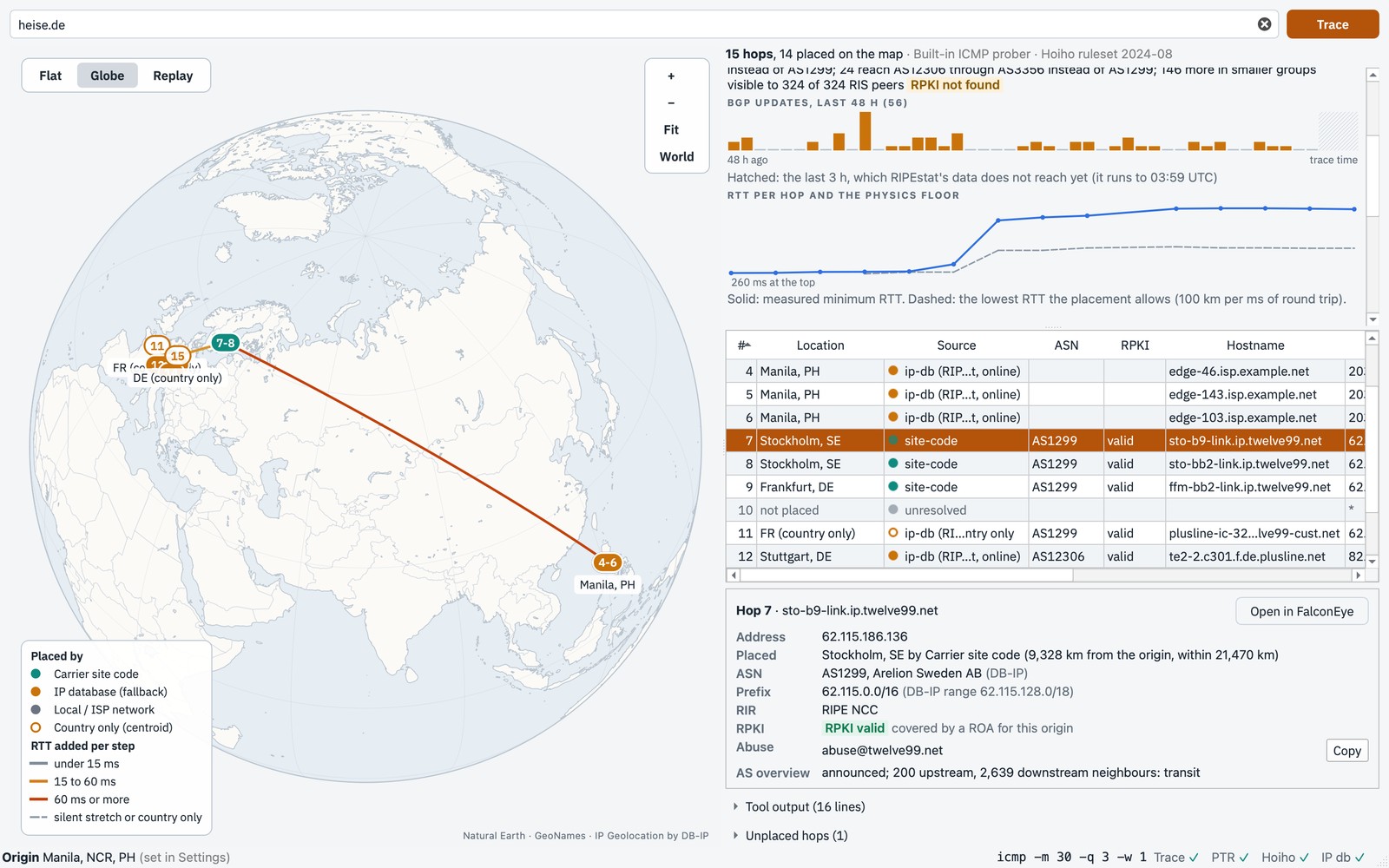
No submarine cables or exchange points yet: the cable data is sold under licence, and PeeringDB's terms do not allow bundling its list. The FAQ has the details.
On your machine, with your tools
The trace runs on your computer with its own tracert, traceroute or
mtr, and the status bar says which, with which flags, and which lookups answered.
Hops appear on the map and in the table as the trace runs; click a marker to find its rows, or
a row to find its marker. Paste a trace someone else ran, say where it came from, and it is
mapped the same way. Export a PNG map, the full trace as JSON, or a PDF report with every hop,
its source and the raw tool output, from the window or the command line.
The same engine powers the Route Map tab in OSINTPH's FalconEye.

The source labels
hoiho- A CAIDA Hoiho rule for that operator matched the hostname and names the city.
site-code- The hostname carries a carrier's own site code, from the bundled table.
ip-db- An IP database placed it, DB-IP Lite on your machine or RIPEstat online (the label says which): a hint, since backbone addresses often sit where the prefix was registered.
ip-db, country only- Only the country is known; hollow marker, kept out of the map's fit.
local- Your network or your ISP's carrier NAT; never looked up anywhere.
What leaves your machine
| What | To | When |
|---|---|---|
| Public router hostnames | CAIDA Hoiho | each trace, unless switched off; cached 30 days |
| Public hop addresses DB-IP Lite does not place | RIPEstat | each trace, unless switched off; cached 30 days |
| Public addresses, prefixes and AS numbers, for route details | RIPEstat | after each trace, unless Online lookups are off |
| Two country codes and an anchor name | RIPE Atlas | after each trace, for the typical latency; public data |
| A download request | DB-IP | only when you choose to download DB-IP Lite |
| Reverse DNS queries | your own resolver | for public hops without a name |
| Your public IP | RIPEstat | only while no origin is set in Settings |
| Target, key, your network's AS | RIPE Atlas | only for an Atlas trace, with your own key; public |
No account, no telemetry, no automatic update check. One switch, Online lookups, turns every lookup off. Private, CGNAT and reserved addresses are never looked up. The full list: privacy.
Support the project
Route Map is free. Donations pay for code signing, hosting, the RIPE Atlas probe, and maintenance time.