
What a visual traceroute shows, and where most of them go wrong
A visual traceroute draws the routers your traffic passes on a map. The map is only as good as the place it gives each router, and that is where most of them go wrong.
What a traceroute is, and what a visual traceroute adds
A traceroute lists the routers your traffic passes on its way to a destination, one line per hop, with how long each router took to answer. Read it from the top: the first lines are your own network, the last line is the destination. Each line has a hop number, the router's name and address, and usually three round-trip times in milliseconds. A large step between two hops usually means a long distance, because light in fibre covers about 200 km per millisecond.
A visual traceroute puts the same hops on a map, so the path reads at a glance: where it crosses an ocean, where it doubles back, which networks it goes through. But a router's location is never in the trace itself. It has to be worked out, from its name, from an IP database, or from the times.
Why hop placement is usually wrong
Most tools ask an IP geolocation database. For a backbone router, the database often knows only the country, or the place where the operator registered the address block, which can be a head office far from the router. So the map shows a path that the packets never took: on one trace from Manila, a commercial traceroute map put a Hong Kong router in Harare (My traceroute went through Zimbabwe. My packets didn't.).
How Route Map places a hop
- Hostname first. Operators name routers after their sites:
ffm-bb2-link.ip.twelve99.netis Arelion in Frankfurt. Route Map reads the names first, with CAIDA's Hoiho rules and a table of carrier site codes, and falls back to an IP database only when the name says nothing: DB-IP Lite on your machine, or RIPEstat online. - Checked against the round trip. Each millisecond of round trip allows about 100 km, plus 300 km of slack for an approximate origin. A placement farther than that is rejected, whatever its source, and the reason is shown. So is a database answer that would need a detour the round trip did not pay for.
- The source on every hop. Each hop says whether its place came from a hostname rule, a carrier site code, an IP database, or nowhere. A hop that cannot be placed stays in the table with the reason.
- Anycast destinations. A destination that answers faster than its registered place allows, as anycast networks do, is placed where the round trip past the last placed hop reaches, and labelled "served from near" that city.
- Between two placed hops. A hop no source places, between two hops placed in one city, is shown in that city with a hollow marker and the label "inferred from neighbours".
What traceroute cannot see
MPLS tunnels hide hops. A traceroute shows the path out, not the way back, which can be entirely different. Hops that do not answer are listed but not placed. And the round-trip check is an upper limit: it proves a hop cannot be farther than the time allows, not that it is where a source says.
How to read one
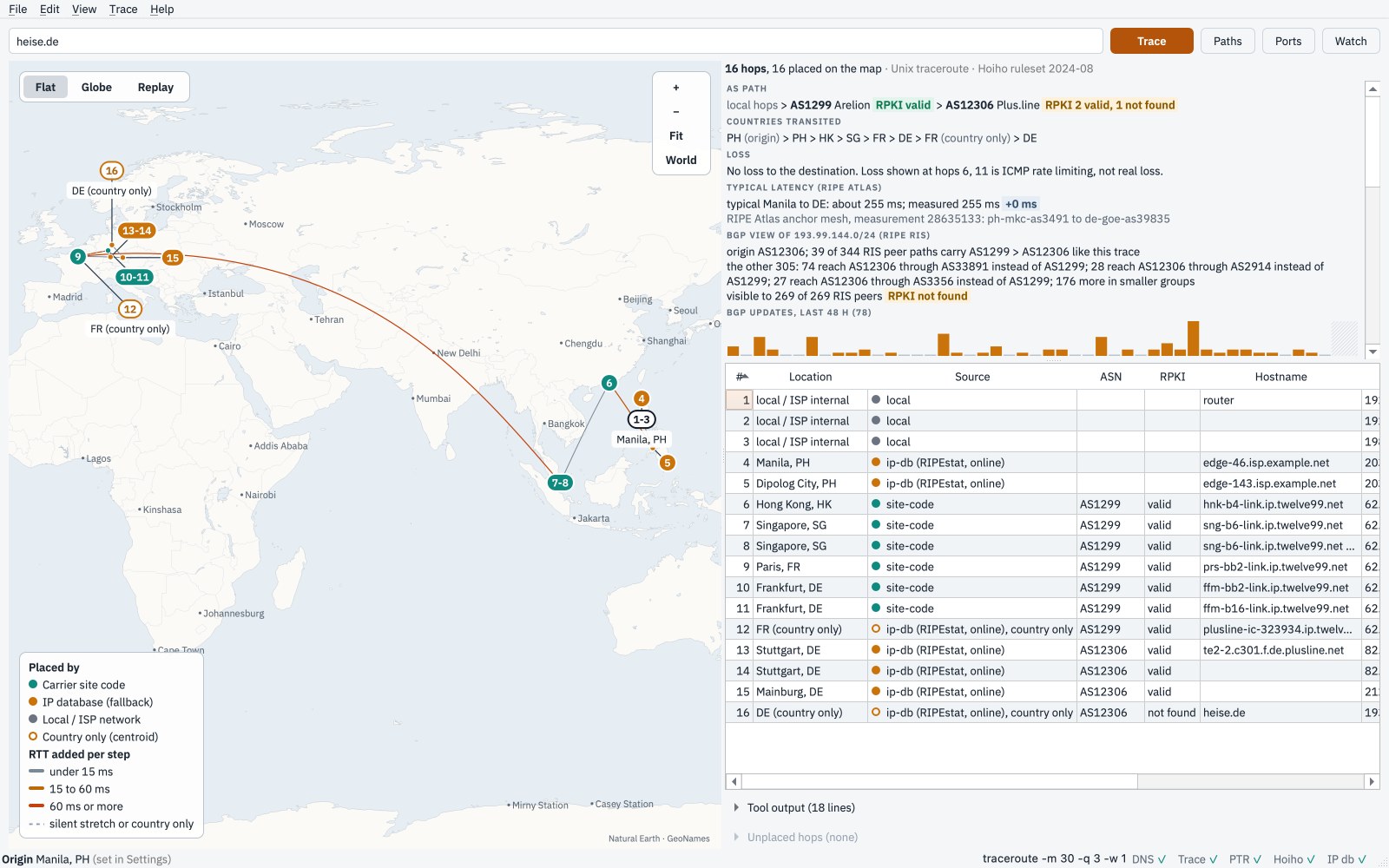
Start at the top of the table: the first hops are your own network and your ISP, placed at
your origin and never looked up. Then follow the Source column: site-code and
hoiho come from the router's own name, ip-db from a database and is a
hint. A line's colour is the round-trip time that step added; a big jump is distance, a time that
drops at a later hop is a router answering slowly, not a slow path. Stars in the middle of a path,
followed by hops that answer, are not a fault: the traffic got through.
Also: Windows Installer Windows Zip macOS Apple silicon macOS Intel Linux Debian, Ubuntu (.deb) Linux Fedora, RHEL, openSUSE (.rpm) Linux AppImage Linux tar.gz. v0.5.0-beta.4, checksums and install steps.
Compare Route Map with VisualRoute and with Open Visual Traceroute.